Tender quantities and trade scopes in hours, verifiable in 2D and 3D
When outsourced construction estimating services leave you waiting on quantities or unsure how they measured each number, CIM Build's AI-first service turns 2D tender packs into measured quantities, trade scopes, and document checks in hours. Verify visible workings, marked-up 2D sheets, and linked 3D elements where drawn in interactive software without repeating the whole takeoff before your estimator prices the tender. Your first live tender project comes at a discount.
Book a demoSend us a live tender and see what it finds
| Item | Unit | Qty | Source |
|---|---|---|---|
| W1 partition, full height | m² | 579.4 | A-1103 · Spec 09 21 |
| W3 acoustic partition, Rw 45 | m² | 232.7 | A-1103 · Acoustic rpt §4 |
| Bulkhead, 13 mm on suspended grid | m | 48.0 | A-3201 |
| Access panels, 600 × 600 | no. | 12 | RCP L3 |
| Shaft wall to riser R2 | m² | Not measured | Spec 09 21 §3.4 |
Trade
Plasterboard and partitions
Scope items
- Measured 17
- No quantity yet 1
One trade's bill, each line under its scope item with the unit, the quantity and the source.
Trace a measured BOQ line back to the drawing and 3D model
Open a measured line in the bill of quantities to check the element behind the figure. Select the partition, bedroom, or ensuite below to verify the same item on the 2D plan and in 3D. Click any surrounding element in the model to outline it on the 2D plan and inspect its type, dimensions, and source. The 3D view consolidates plans, elevations, details, and schedules, with specification and report requirements linked where available so your team checks scope, quantities, and sources in context.
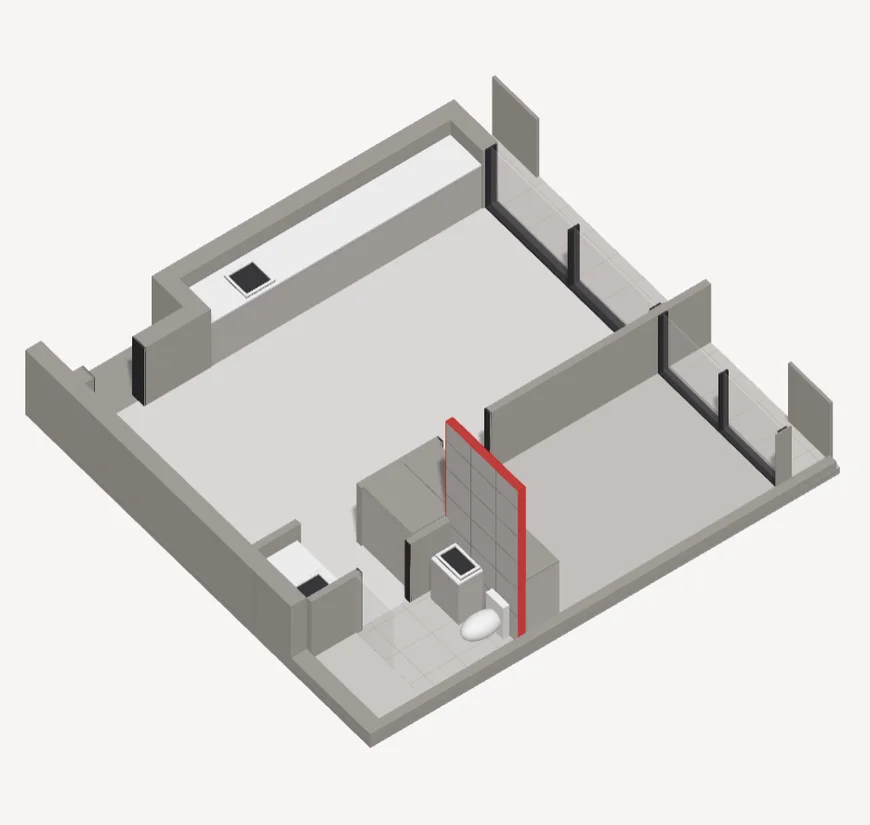
| Element | Quantity | Source |
|---|---|---|
| W6B bedroom/ensuite partition | 5.02 m² | Ground floor plan & wall schedule |
| Bedroom floor (carpet) | 12.01 m² | Ground floor plan & room boundary |
| Ensuite floor (tile) | 3.63 m² | Ground floor plan & room boundary |
W6B bedroom/ensuite partition 1.598 m plan length × 3.140 m height from storey levels (5.018 m² gross face, one side, before deductions). Wall runs to storey height above the 2.65 m bedroom ceiling and 2.40 m ensuite ceiling. 3D view shows tile on the ensuite face and paint on the bedroom face for visual verification.
Illustrative reconstruction.
What you send and what comes back
CIM Build is an AI-first service delivered through interactive software. Through CIM Build's preconstruction modules, your team gets first-pass tender quantities, trade scopes, document checks, and subcontractor quote comparisons from 2D packs with visible workings and verifiable 2D/3D source links.
Your first live tender project comes at a discount: our team agrees the review scope with you, runs your live tender pack, and walks your estimator through results in hours that you can verify and use, with timing depending on pack size, document quality, and review scope.
Estimators can understand the whole project together in one 3D view before pricing a tender. Model geometry draws from disparate plans, elevations, details, and schedules, with specification and consultant report requirements linked where available. Verify each element, its quantity, linked requirements, and originating source sheets directly from that shared context.
| Stage | What happens |
|---|---|
| What you send | 2D drawings, schedules, specifications, Employer's Requirements (ER), and consultant reports, plus subcontractor quotes when running quote comparisons |
| What comes back | Structured schedules, a 3D model, a bill of quantities with written scope items carried beside measured lines, and subcontractor quote comparisons once quotes are uploaded |
| How you check it | Open any measured line on its 2D drawing sheet and in the 3D view, inspect written scope citations, and review separate measured, adjusted, and net totals |
| Who signs off | Your estimator or commercial manager reviews the quantities, enters market rates, prices preliminaries and risk, and signs off the tender |
How CIM Build compares with an outsourced estimating service
Commercial builders of all sizes use outsourced estimating services to absorb tender peaks. Both approaches aim to deliver a usable first pass under deadline pressure, and any provider should be judged on verifiable working and revision handling.
| Criterion | Typical outside estimating service | CIM Build |
|---|---|---|
| What you hand over | You brief an external estimator and send the tender pack for off-site turnaround | Your team uploads the 2D tender pack directly into your project workspace |
| What you receive | Confirm whether deliverables include working sheets, trade breakdowns, and editable spreadsheets in your required format | Measured quantities, a 3D model, a bill of quantities with written scope items, and exports to Excel, CSV, or PDF |
| How working is shown | Confirm whether the provider supplies marked-up drawings, measurement workings, and document references for checking each line | Every measured line links to its 2D drawing sheet and 3D elements where drawn, with written scope items cited to their document |
| What happens on a revision | Revision allowances and turnaround vary by provider. Confirm how mid-tender addenda are handled in the agreed fee | Upload revised sheets, see flagged lines, and regenerate while keeping earlier adjustments, rates, factors, and notes on retained lines |
| Who holds pricing and judgement | Confirm whether the brief covers quantities only or indicative rates, while your team still signs off market pricing and risk | CIM Build measures and structures scope. Your estimator applies market rates and commercial judgement in their own pricing tools, since CIM Build has no cost database |
| How it is charged | Confirm the fee basis (fixed tender fee, day or hourly rate, or per-trade quote) and what exclusions apply before issuing the pack | Priced per project, based on the number of pages processed for that project |
How the estimating workflow runs in 3 steps
- Your team starts the run: Upload your 2D tender drawings, schedules, specifications, Employer's Requirements, and consultant reports, select the project trades, and run the schedules and bill of quantities.
- CIM Build produces the first pass: CIM Build extracts schedules, locates marks on their drawings, builds an explorable 3D model, measures quantities into trade sections, and carries in-scope written requirements beside measured lines.
- Your estimator reviews, prices, and hands off: Open any line in 2D and 3D, enter separate adjustments, market rates, factors, and notes, compare subcontractor quotes against trade scope, and export to Excel, CSV, or PDF.
Building estimator workload for lean teams and larger builders
A building estimator turns a multi-discipline tender pack into a priced submission by measuring quantities, checking written scope, levelling subcontractor quotes, and pricing risk. Commercial builders cover that workload in three ways: hiring an additional full-time estimator, engaging an outsourced estimating service during peaks, or equipping their current team with software that automates the first pass.
CIM Build gives small estimating teams the capacity to price complex commercial tenders, and lets larger regional builders apply one consistent review workflow across multi-discipline packs. Manual measurement and bill assembly on complex commercial tenders can take weeks. CIM Build delivers first-pass results in hours, depending on pack size, document quality, and review scope.
When you only need drawing-level measurement and marked-up sheets, see our quantity takeoff services alternative. For trade-bill and commercial verification workflows, see quantity surveying and our quantity surveyor cost guide. To explore the underlying product workflows, read bill of quantities software and bid levelling.
What stays with your estimating team
CIM Build handles measurement, bill structuring, written scope extraction, and quote comparison against trade scope. Your team retains full control over:
- Market rates, your own cost libraries or pricing tools, and supply-chain rate selection
- Preliminaries, inflation allowances, contingency, and commercial margin
- Measurement conventions, RICS NRM2 classification, and contractual precedence
- Final tender pricing, qualifications, and submission approval
CIM Build is priced per project, with the project price determined by the number of pages we process for that project. Contact our team for a quote on your project.
Why commercial builders run estimating packs in CIM Build
Manual first-pass estimating on complex commercial tenders can take weeks. CIM Build delivers reviewable results in hours, depending on pack size, scope, and document quality.
Your team exports a usable bill of quantities to Excel, CSV, or PDF, with generated IFC models available separately. Estimators probe measured and model-derived lines to 2D sheets, 3D elements where present, and separate measured, adjusted, and net totals. Written scope items trace to their cited clauses so reviewers check working directly.
Teams also trigger report compliance and Employer's Requirements checks against drawings to catch unpriced scope with source-cited RFI drafts, rerun affected lines on drawing revisions, and level subcontractor quotes on a common basis.
Frequently asked questions
Does CIM Build supply a hired building estimator or priced tender?
No. CIM Build is an AI-first service delivered through interactive software. Its preconstruction modules generate reviewable quantities, trade scopes, and document checks, and do not include a cost database or automated bid pricing. Your estimator enters rates and signs off the tender.
How does the first tender review work?
Select Book a demo and leave your contact details. Your first live tender project comes at a discount. Our team follows up to agree the review scope and arrange safe document sharing, runs the pack to deliver results in hours that you can verify and use (depending on pack size, document quality, and review scope), and walks your estimator through the outputs and 2D/3D source links.
Can we benchmark CIM Build against an existing estimate or QS bill?
Yes. Mention your existing bill in the optional notes on the contact form. Our team scopes the comparison with you, runs your tender pack through CIM Build, and walks your commercial team through differing lines on their 2D sheets and 3D model elements.
What happens when revised drawings or addenda arrive mid-tender?
Upload the revised 2D sheets to the project. Bill lines measured from an earlier sheet flag that a newer revision exists. When you regenerate the bill, CIM Build keeps your earlier adjustments, rates, factors, and notes on retained lines, and rows you added manually stay untouched. You can save milestones and compare two saved internal bill revisions.
How does CIM Build help with subcontractor quote levelling?
You can export the reviewed bill of quantities to issue common quantities with your trade packages, and run subcontractor quote comparison in CIM Build as a separate workflow to check bidder offers against trade scope before award.
What formats export to our estimating software?
Reviewed bills of quantities, separate adjustments, net totals, rates, factors, notes, and trade summaries export to Excel, CSV, or PDF for your existing estimating sheet. You can upload and open consultant IFC models in your workspace and download the generated 3D model as IFC. There is no native two-way CostX or Cubit link.
How is CIM Build priced?
CIM Build is priced per project, and the project price is determined by the number of pages we process for that project. Share your project details through the contact form for a quote.
Send us a live tender and see what it finds
Your first live tender project comes at a discount. We scope the review with you, run your drawings, schedules, and specifications, and walk through the evidence with your team. Get results in hours inside interactive software where your team can trace sources and verify every measurement and finding. Timing depends on pack size, document quality, and review scope.
Book a demoLeave your contact details first. Our team will follow up to arrange safe document sharing and a walkthrough.