Construction risk management software for builders
Construction risk management software spans enterprise risk, site safety, schedule modelling, and document risk. See how each category maps by job and where CIM Build fits for commercial builders.
Construction risk management software falls into 4 distinct categories: enterprise and corporate risk registers, site safety (WHS) and incident platforms, schedule risk modelling tools, and document and design risk software. Commercial builders rarely buy 1 system for all 4 jobs because each tracks different records and serves different project roles.
As outlined in Procore's Construction Project Management Guide (Part 1, Chapter 2), managing construction risk follows a structured cycle: identify risks, assess likelihood and impact, decide mitigation actions, assign responsibility, and monitor for new risks as the project evolves. This guide focuses on document-driven commercial and design risk during tendering and delivery, and states clearly which risk jobs stay with other systems.
Job matrix: construction risk categories and CIM Build's role
Before shortlisting tools, separate the risk jobs your business needs to run. The table below maps 7 common risk management jobs to their typical system owners and shows where CIM Build fits.
| Risk job | What the job needs | Typical system owner | CIM Build role |
|---|---|---|---|
| Enterprise and corporate risk registers | Portfolio-level risk matrices, likelihood and consequence scoring, and board reporting | Enterprise risk management (ERM) or governance platform | Not covered |
| Site safety (WHS) and incident management | SWMS, site inspections, hazard logs, incident reporting, and safety compliance tracking | Construction safety or field management software | Not covered |
| Schedule and delay risk modelling | Critical-path analysis, delay impact modelling, and quantitative schedule simulations | Scheduling and schedule risk software | Not covered |
| Insurance and financial exposure tracking | Subcontractor insurance certificates, bonding, cash-flow risk, and cost-to-complete forecasting | ERP, accounting, or compliance platform | Not covered |
| Cross-document requirement and report checks | Compare Principal Project Requirements (PPR), specifications, and consultant reports against 2D drawings and schedules | Construction document review software | Does |
| Revision change detection | Identify unclouded graphic, dimensional, and note changes between transmitted drawing revisions | Drawing comparison or document review tool | Does |
| Document risk register and source-backed RFIs | Track cited findings with owner and status, and raise drafted RFIs tied to sheets and clauses | Project management platform or document review workspace | Does |
Enterprise risk scoring, WHS safety management, and schedule simulations stay in their dedicated platforms. Where commercial teams otherwise hunt through specifications, consultant reports, and drawing revisions by hand, CIM Build's design risk management and revision tracking workflows extract written obligations, flag conflicts and unclouded changes across tendering and delivery, and draft cited RFIs for human review.
Worked example: lift shaft wall acoustic target
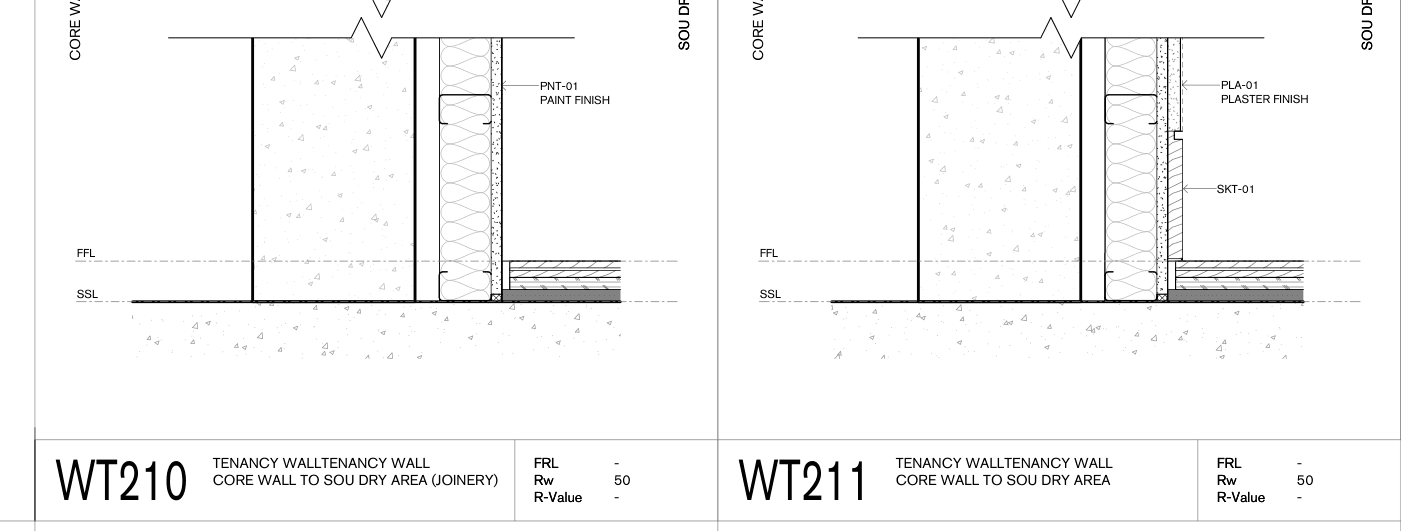
Illustrative reconstruction. When an acoustic report sets a project target above the NCC minimum, the architectural wall schedule can still carry the baseline rating.
| Source requirement | Drawing and schedule | Discrepancy | Qualitative exposure | Next decision |
|---|---|---|---|---|
| Acoustic Report Table 3 (p. 9): documented NCC minimum column lists Rw50 (Impact: Discontinuous) for walls separating a dwelling from a plantroom or lift shaft. Client-elected project requirement sets Rw65 (Impact: Discontinuous). | Wall Type Schedule A5711 and ground floor plans A1502 (east) and A1503 (west) schedule WT210 and WT211 at Rw50 along the lift shaft dwelling boundary | Scheduled Rw50 build-up matches the NCC minimum column, below the client-elected Rw65 project requirement | Ordering or framing the Rw50 build-up risks rework, acoustic re-testing, or a variation if Rw65 governs under the contract | Inspect the cited report table, wall schedule, and floor plans together, then raise an RFI before lining procurement to confirm whether Rw65 governs and obtain a coordinated WT210/WT211 build-up |
How CIM Build supports document-driven risk control
Builders of all sizes use CIM Build to surface, assign, and close document risks in 3 steps:
- You load the active set and start a review: Upload 2D drawings, schedules, specifications, PPR documents, and consultant reports, or connect project files through integrations. Formal transmittal records remain in your document control platform, such as Oracle Aconex transmittals. Choose what to check across consultant report compliance, PPR vs drawings, or revision tracking, and start the run.
- CIM Build extracts clauses and produces cited findings: CIM Build checks written requirements against drawings and schedules and marks cited regions on each PDF page with the clause, sheet reference, and finding outcome (Compliant, Non-compliant, or Cannot verify).
- Your team assigns owners, clarifies, and hands off: Commercial and design managers track status and owners in registers and export findings to PDF (with cited source pages), Excel, or CSV. From any finding, a team member can raise an RFI in suggested RFIs: CIM Build drafts the question with the cited sheet and clause attached, and the reviewer edits, picks recipients, and sends it by email or, on a connected project, as Aconex project mail or a Procore RFI, with replies returning to the RFI. When updated documents arrive, a person refreshes the review while keeping finding IDs, statuses, and team edits.
What to check before choosing construction risk software
- Match the tool to the risk source: Keep WHS safety, enterprise risk scoring, schedule modelling, and document review in tools built for those records.
- Inspect cited evidence directly: For document risk, verify that every risk entry links straight to the source sheet, revision, and report clause so teams can check it quickly.
- Keep machine findings separate from commercial decisions: Confirm that a Cannot verify finding prompts a human check of adjacent sheets or an RFI, and that your team decides contract precedence and pricing allowances.
- Close the loop through RFIs and revisions: Check that identified risks turn cleanly into issued RFIs and survive drawing revisions without losing history.
Frequently asked questions
Does CIM Build provide enterprise risk scoring or site safety (WHS) management?
No. Enterprise risk matrices, probability-impact scoring, WHS safety forms, and incident tracking stay in dedicated ERM and safety platforms. CIM Build focuses on document-driven design and commercial risks across drawings, schedules, specifications, PPR documents, and consultant reports.
Does CIM Build certify building code, fire, or acoustic compliance?
No. CIM Build surfaces cited report and specification clauses beside drawing and schedule evidence so your team can inspect discrepancies and missing details. The builder and specialist consultants remain responsible for compliance, document precedence, and sign-off.
What does a Cannot verify finding mean in a risk register?
Cannot verify means drawing or schedule coverage for a written requirement was not confirmed in the uploaded set. It signals a gap to check across adjacent sheets or clarify through an RFI.
Can teams issue RFIs directly from a document risk finding?
Yes. A team member raises an RFI from the finding, CIM Build drafts the question with the cited sheet and clause attached, and the reviewer edits the wording, chooses recipients, and sends it by email or, on a connected project, as Aconex project mail or a Procore RFI.
How is CIM Build priced for document risk review?
CIM Build is priced per project, and the project price is determined by the number of pages we process for that project. Contact CIM Build for a quote on your project.
Test document risk review on a live tender
Bring a representative tender pack with consultant reports, specifications, and 2D drawings to see which cross-document risks surface before pricing. Contact CIM Build to run a live tender review.
Send us a live tender and see what it finds
Your first live tender project comes at a discount. We scope the review with you, run your drawings, schedules, and specifications, and walk through the evidence with your team. Get results in hours inside interactive software where your team can trace sources and verify every measurement and finding. Timing depends on pack size, document quality, and review scope.
Book a demoLeave your contact details first. Our team will follow up to arrange safe document sharing and a walkthrough.