Feature
Revision tracking
Compare drawing sets. Focus your review on what matters.
A reissue brings a whole drawing set to check. CIM brings matched drawing pairs, comparison status and detected findings into one review workflow. Check the source, keep gaps in coverage visible, and decide which changes affect scope, procurement or work already underway.
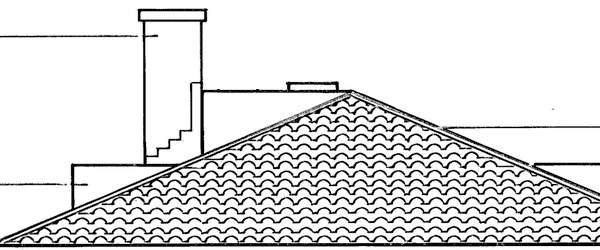
Rev C
Rev D
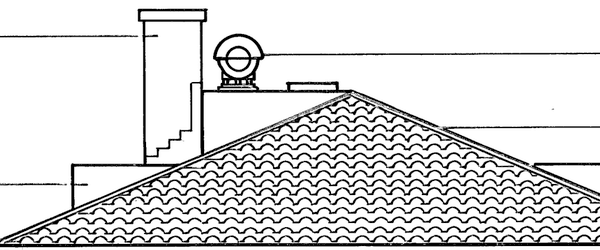
| Change | Where | Clouded |
|---|---|---|
| Metal siren added beside the chimney | FL-384-F · roof | No |
| Annotation added: METAL SIREN | FL-384-F · notes | No |
Illustrative comparison: two revisions with highlighted differences. Base sheet: HABS FL-384-F, Library of Congress, public domain. Review detected findings against the source.
The old way
Unclouded changes surface in the field, or at the final payment application
The cloud is missing, and so is the change
The transmittal lists the sheets that changed. A moved slab level or a rewritten note on them is left to the reader to find.
Nobody has the days to re-check every sheet
So the set goes through on faith that the consultant clouded their own work.
The change order cannot be substantiated
The change register is kept by hand when there is time. Without the revision and what it was priced against, the claim is an argument.
With CIM
Detected differences connected to the drawings for review
Inspect the detected difference
Open the earlier and later source areas. Check geometry, dimensions, annotations and nearby references before relying on a finding.
Review the findings together
Use the comparison register and drawing references to inspect the detected findings. Keep unresolved questions visible for follow-up.
Decide what needs action
The responsible team checks scope, procurement and work already underway. A detection alone establishes neither entitlement nor service of a contractual notice.
What it does for your team
Builders
Check the effect on the package
Verify detected differences against the source, then decide whether pricing, procurement or a clarification needs attention.
Certifiers and surveyors
Use the source to guide review
Inspect the earlier and later documents and decide what further assessment is required. Keep the limits of the comparison visible.
Consultants
Clarify the intended change
Check findings against annotations and related references, and provide a clearer source when the instruction is uncertain.
Example findings
See the change. Check what it affects.
A difference list still leaves a construction review to do: which sheets were compared, what changed, and what affects the package. With ChatGPT or Claude, make project context, sheet pairing and review instructions explicit in your setup. Your team still decides what needs action.
Illustrative example · A-210, revision C → D
Door opening increased from 920 to 1020 mm
A-210 · C → DDoor opening: 920 → 1020
100 mm wider. Check the door schedule and any order already placed before changing procurement.
From comparison to clarification
- Compare drawing sets
Choose the previous and current issues. Check matched sheets and anything left unpaired.
- Review meaningful changes
Verify findings that could affect scope, procurement or installed work.
- Draft RFIs
Turn a checked finding into a clarification question with its drawing references.
RFI drafting is in beta. Your team reviews each draft before issuing it.
Use bulk compare for a full issue. Keep unmatched sheets and incomplete comparisons visible.
Practical guides
Work through the review in CIM Build
- Compare tender drawings with contract drawings
Check the priced set, inspect source evidence and work through the commercial review.
- Establish a reliable head-contract baseline
Keep the agreed issues clear and account for renamed, unmatched and withdrawn sheets.